
XM Rebate: Cashback Rates & Up to 90% of IB Commission Back
XM rebate allows eligible traders to receive cashback from the Introducing Broker (IB) commission generated through their trading activity. The rebate helps reduce effective trading costs without changing XM’s original pricing.
Cashback rates and calculations through RebateFX offer up to 90% of the eligible IB commission actually received. Traders can use the XM rebate calculator formula to estimate potential cashback based on trading volume, account type, instruments, and applicable commission rates.
Registration starts by opening an XM trading account through the RebateFX referral link or partner code. Traders must complete account verification and confirm their IB connection before trading. You can also learn more about RebateFX and its cashback services before joining.
Payouts are processed daily for qualifying trades, with approved cashback credited directly to the trader’s XM MyWallet after commission verification. The following guide explains how to calculate XM rebates, register an account, manage IB connections, and track cashback payments.
Contents:
What Is XM Rebate and How Does It Work?
XM rebate is a trading cashback arrangement that allows eligible traders to receive a portion of the commission XM pays to an Introducing Broker (IB). The cashback amount depends on the partner’s eligible commission earnings and the rebate percentage applicable to the trader.
Unlike a promotional trading bonus, XM rebates are linked to qualifying trading activity and the broker’s partner commission structure.
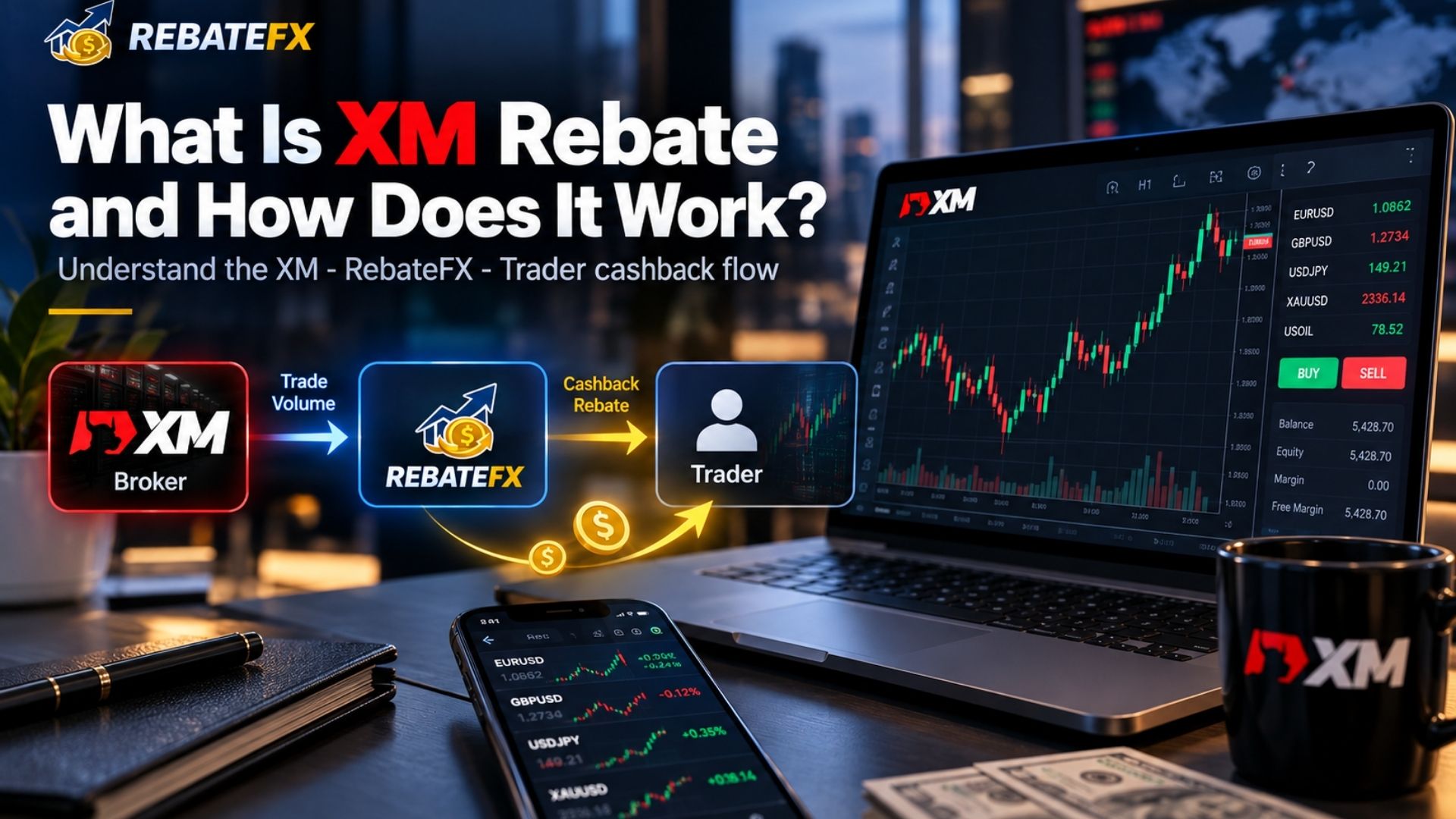
How Does the XM Rebate Program Work Through RebateFX?
The XM rebate program through RebateFX involves three parties:
- XM Broker: Provides trading accounts, executes transactions, and calculates eligible partner commissions.
- RebateFX: Operates as an Introducing Broker and shares a percentage of qualifying IB commissions with eligible traders.
- Trader: Trades through an eligible XM account linked to RebateFX and receives cashback after the relevant commissions are verified.
When a trader completes qualifying trades, XM may calculate a commission payable to RebateFX under its partner agreement. RebateFX then determines the trader’s cashback based on the applicable rebate percentage.
The rebate is calculated from the eligible IB commission received, rather than directly from the total spread or trading commission charged by XM.
Importantly, RebateFX does not execute trades, manage trading funds, or replace XM’s official customer support. Account verification, deposits, withdrawals, and order execution remain XM’s responsibility.
Is XM Rebate Different From XM Cashback?
The terms XM rebate, XM cashback, and XM forex rebates generally refer to the same concept: returning part of an eligible broker-generated partner commission to the trader. However, cashback providers may apply different rebate rates, calculation methods, and payment conditions.
Unlike a direct spread discount or trading bonus, an IB rebate is typically calculated separately after the qualifying commission has been confirmed.
What Are the Benefits of Getting XM Rebates Through RebateFX?
The main benefit of XM rebates is the opportunity to recover part of the effective trading costs associated with eligible transactions. For traders who already have a suitable trading account and strategy, cashback can provide an additional way to manage trading expenses.
RebateFX helps traders understand how cashback is generated, how much they may receive, and which conditions must be met before participating.
How Can XM Cashback Reduce Trading Costs?
XM trading accounts may involve spreads, commissions, and overnight financing charges. Although cashback does not eliminate these costs, eligible rebates can reduce the net expense of qualifying trades.
For example, if a trade incurs $12 in spread costs and generates $4 in eligible cashback, the effective cost falls to $8, excluding any other applicable charges. This illustrates how XM rebates can reduce trading expenses without changing the broker’s original pricing.
A rebate may also be available on losing trades if the transactions meet the applicable commission requirements. However, cashback does not reduce market exposure, prevent margin calls, or protect traders from financial losses.
Why Consider RebateFX for XM Cashback?
RebateFX provides information and support for traders interested in XM broker cashback arrangements.
Its XM rebate program includes:
- Cashback opportunities based on eligible IB commissions.
- Registration guidance for traders opening an XM account.
- Information about IB connections and eligibility for existing accounts.
- Explanations of rebate calculations based on commission and trading volume.
- Guidance on checking cashback records and resolving payment issues.
These resources help traders understand the program, estimate potential cashback, and verify their eligibility before trading.
For more information about the research behind these guides, readers can explore the author profile of Liam Dravon, who covers XM rebate conditions, IB relationships, and trading costs.
The actual value of an XM rebate depends on the commission generated, qualifying trading activity, and the cashback amount successfully verified and paid.
XM Rebate Rates and Calculator: How Much Cashback Can You Get?
RebateFX advertises XM cashback rebates of up to 90% of eligible IB commission actually received. This is the maximum published sharing percentage, not a fixed cashback amount per trade or a guaranteed payment for every trader.
Actual XM trading cashback depends on the account type, trading instrument, eligible volume, and applicable partner conditions.
What Is the XM Rebate Rate?
The XM rebate rate determines how much of the eligible Introducing Broker commission RebateFX shares with the trader.
Several factors can affect the final cashback amount:
| Factor | How It Affects XM Rebate |
| Account type | Different account structures may generate different partner commissions. |
| Trading instrument | Forex pairs, metals, indices, and other products may have different commission arrangements. |
| Trading volume | Higher eligible trading volume may generate more total partner commission. |
| IB affiliation | The account must be linked to a qualifying partner arrangement. |
| Regional eligibility | Commission models and account conditions may differ by jurisdiction. |
| Trade eligibility | Only qualifying transactions contribute to the final rebate. |
For example, XM Standard and Ultra Low accounts may have different trading costs and partner commission structures. A higher cashback amount therefore does not necessarily mean lower overall trading expenses.
Traders can also explore FBS Rebate, which offers a similar commission-sharing model but follows its own account eligibility and rebate conditions.
International traders should note that XM partner commission structures vary by region. Some markets may use CPA-based arrangements rather than ongoing lot-based commissions, so traders should confirm their account’s rebate eligibility before registering.
How to Calculate Your XM Rebate
The basic XM rebate calculator formula is:
XM Rebate = Eligible IB Commission Received × Applicable Rebate Rate
For example, if RebateFX receives $100 in eligible IB commission and the applicable rebate percentage is 90%, the calculation is:
$100 × 90% = $90
Under these conditions, the trader would receive $90 in cashback.
The following table illustrates different rebate scenarios:
| Eligible IB Commission | Rebate Rate | Estimated Cashback |
| $10 | 90% | $9 |
| $25 | 90% | $22.50 |
| $50 | 90% | $45 |
| $100 | 90% | $90 |
| $200 | 90% | $180 |
These figures are illustrative calculations using the advertised maximum rate. Actual rebate payments depend on verified IB commissions and the trader’s applicable program conditions.
How to Estimate XM Rebate per Lot
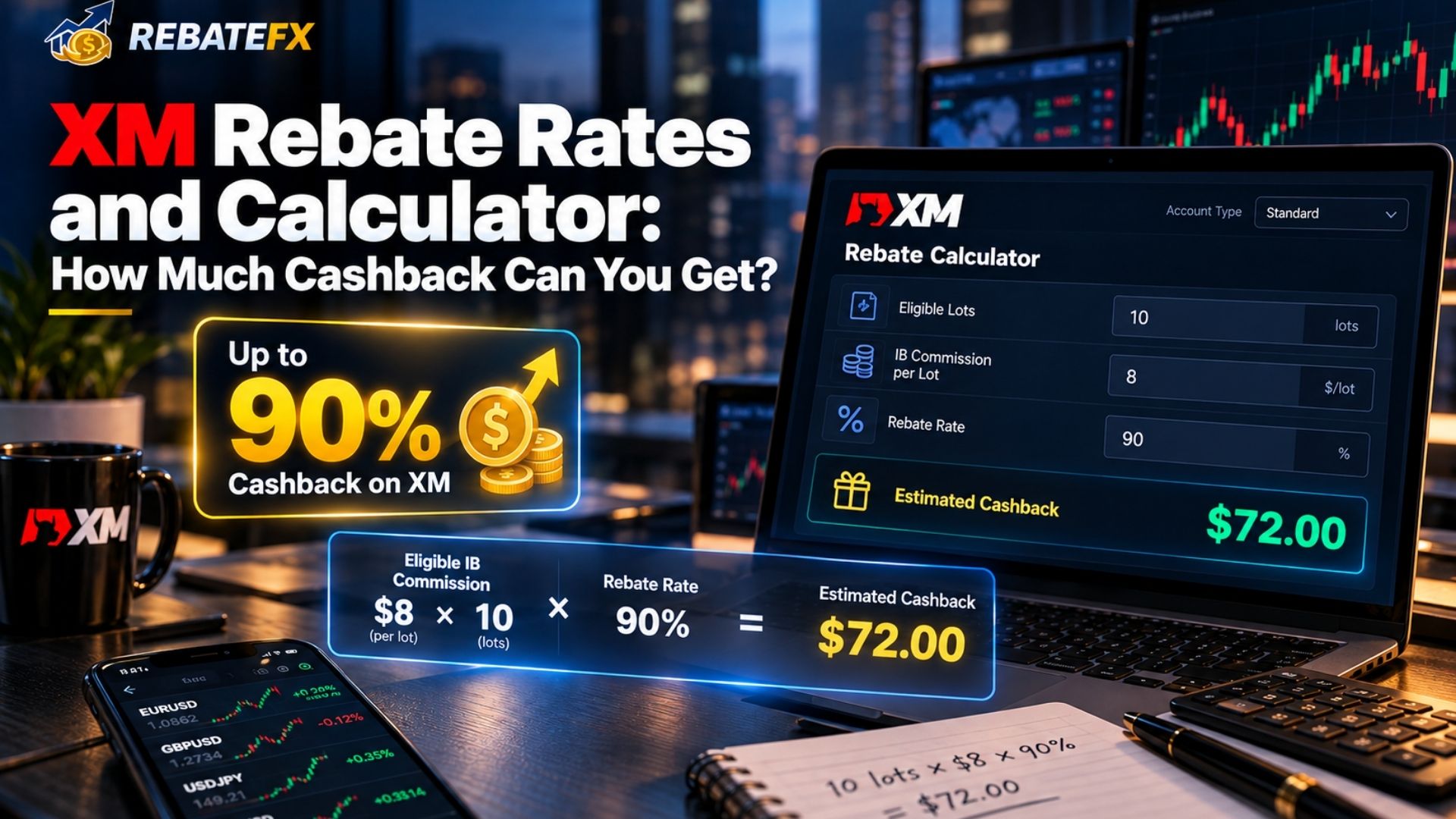
Traders who know their eligible IB commission per lot can estimate cashback using this formula:
Estimated Rebate = Eligible Trading Lots × IB Commission per Lot × Rebate Rate
For example, assume:
- Eligible trading volume: 10 standard lots.
- IB commission: $8 per standard lot.
- Applicable rebate rate: 90%.
The estimated cashback would be:
10 × $8 × 90% = $72
The $8 commission used here is hypothetical and does not represent a published RebateFX rate for any specific XM instrument.
For a more accurate calculation, traders need the actual IB commission associated with their account type and trading instrument.
An XM rebate calculator should account for eligible trading volume, instrument-specific commissions, and the applicable sharing percentage. The final cashback amount may differ from the initial estimate after commission verification.
For comparison, the Tickmill Rebate guide explains how different account types and IB commission structures can affect cashback estimates per lot.
How Much Can Cashback Reduce Your Effective Trading Cost?
Once the rebate has been confirmed, traders can estimate their effective trading costs using:
Effective Trading Cost = Spread Cost + Trading Commission − Rebate Received
For a complete cost comparison, other applicable expenses, such as swaps or overnight financing charges, should also be considered.
Rather than choosing an account solely because it advertises higher cashback, traders should compare XM’s actual trading conditions and the verified rebate available for their account.
Traders comparing trading costs across brokers can also review IC Markets Rebate to understand how cashback works with Standard and Raw Spread accounts.
How to Register an XM Account to Receive Forex Rebates
To receive XM rebates through RebateFX, traders must register an eligible XM account using the correct referral link or partner code. RebateFX offers cashback of up to 90% of the eligible IB commission received, subject to account and trading conditions.
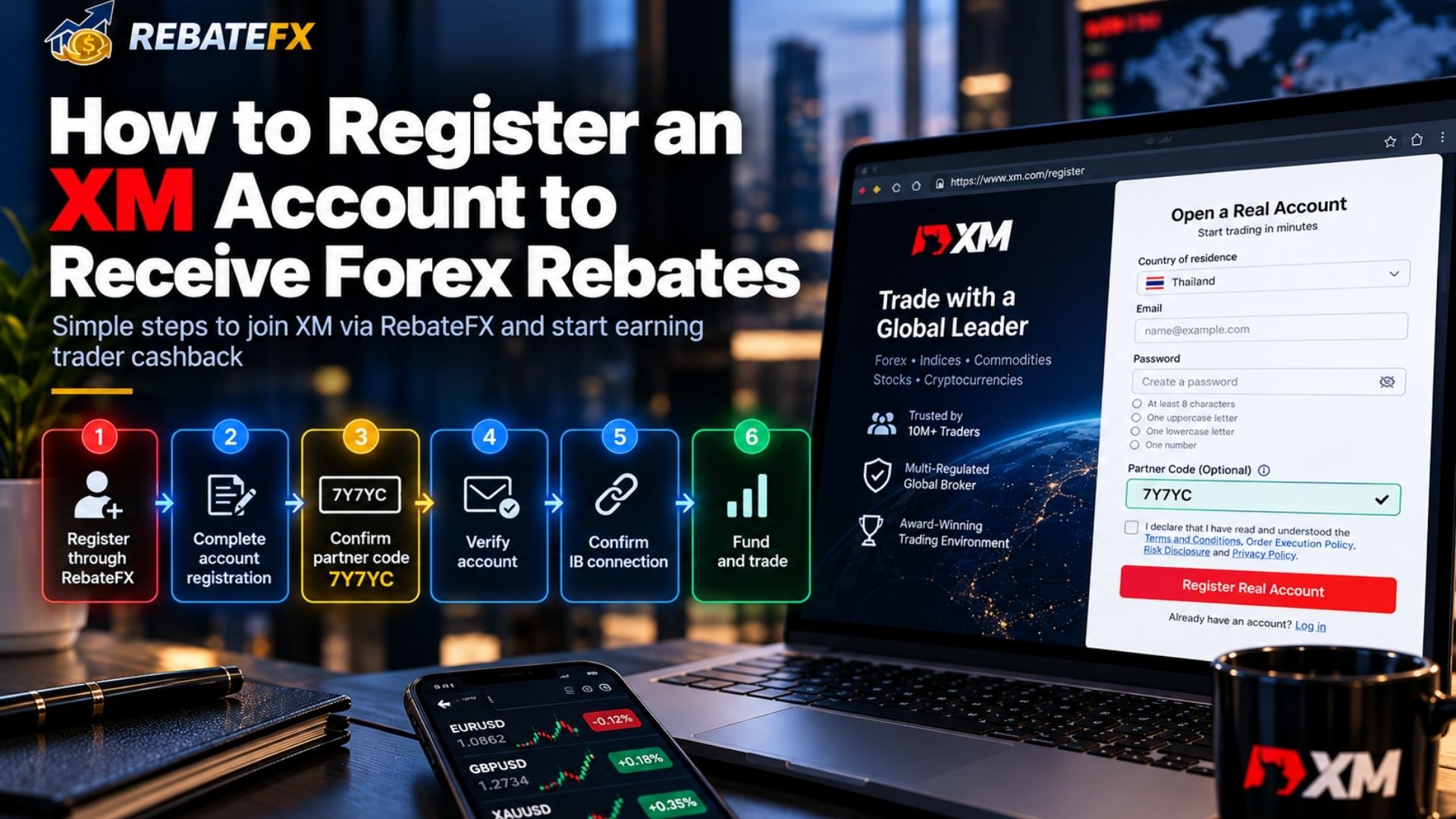
Follow these six steps to register your XM account, confirm your referral connection, and start generating cashback from qualifying trades:
Step 1: Register Through the RebateFX Referral Link
Visit the XM Rebate page on RebateFX.org and click Sign Up Now to access the XM registration page through the RebateFX referral link. Always use the designated referral link to ensure your registration can be attributed to the correct Introducing Broker (IB).
Step 2: Complete Your XM Account Registration
Fill in the required information, including your name, email address, country of residence, and other details requested by XM. Choose a suitable trading account and platform, such as (MT4, MT5, Standard, Micro or Ultra Low), depending on the options available in your region.
Step 3: Confirm the RebateFX Partner Code
The RebateFX referral code for XM is 7Y7YC.
If XM provides a Partner Code field during registration, enter this code. If you register through the RebateFX referral link, the partner association may be applied automatically, but you should still confirm it.
Step 4: Verify Your XM Trading Account
Complete XM’s identity verification process by submitting the documents requested through its official registration system. Once verification is complete, your account can access the trading and funding functions available under XM’s conditions.
Step 5: Verify Your RebateFX IB Connection
Before trading, confirm that your XM account is correctly linked to the RebateFX Introducing Broker program. If RebateFX requires your XM trading account number for rebate verification, submit it through the official support channel. Do not share your trading password or security codes.
Step 6: Fund Your Account and Start Trading to Earn Rebates
After confirming your account eligibility, deposit funds using a payment method supported by XM.
You can then begin trading through your linked XM account according to your own trading plan. Qualifying trades may generate IB commissions, allowing you to accumulate XM cashback through RebateFX.
The final rebate amount depends on your account type, trading instrument, eligible volume, and applicable rebate conditions.
How to Change IB in XM and Get Rebates With an Existing Account
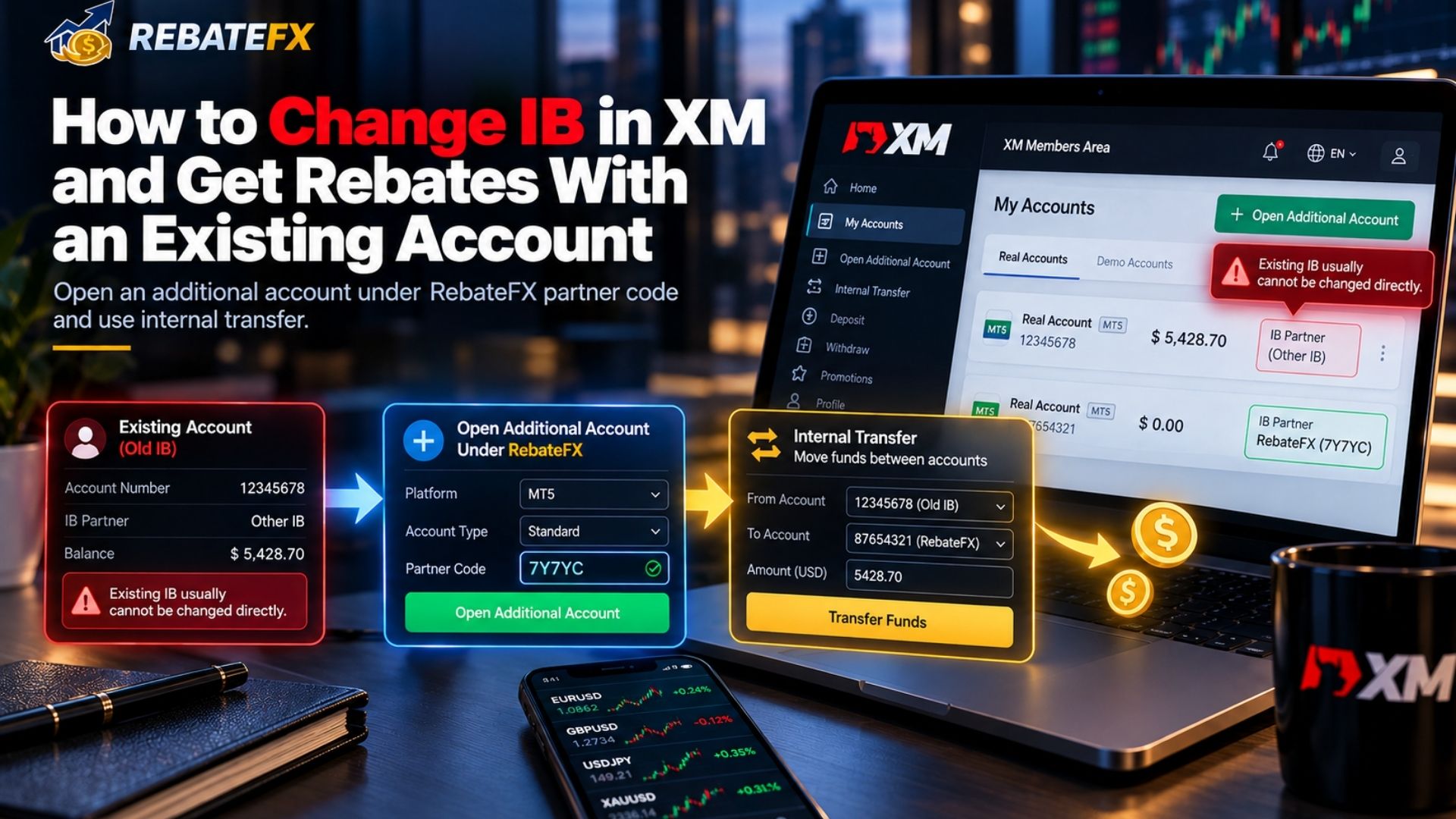
If you already have an XM account and want to receive rebates through RebateFX, you generally cannot change the Introducing Broker (IB) code linked to your existing trading account. However, you may be able to open an additional XM trading account under a new partner code.
Can You Change Your Existing XM IB?
XM generally does not allow traders to directly replace the partner code assigned to an existing trading account. This means you cannot simply edit your current IB code to start receiving XM rebates through RebateFX.
Instead, eligible traders can open an additional trading account within their existing XM profile and register it under the RebateFX partner code.
How to Get XM Rebates With a New Trading Account
Follow these steps to connect a new XM trading account with RebateFX:
- Log in to XM: Access your existing XM Members Area or XM App.
- Open an Additional Account: Select the option to create a new live trading account.
- Enter the RebateFX Partner Code: Use 7Y7YC in the Partner Code field, if available, and confirm the referral connection.
- Transfer Your Funds: Once the new account is verified and eligible, use XM’s Internal Transfer feature to move available funds from your old account, subject to XM’s transfer conditions.
- Start Trading: After confirming the new account is linked to RebateFX, qualifying trades may begin generating XM rebates.
You do not need to close your original XM account. You can keep it or request closure if you no longer need it, provided any open positions and remaining funds have been handled appropriately.
Important: Additional accounts, partner-code registration, and internal transfers depend on XM’s rules and your region. Traders in the UK or EU may face different partner restrictions. Before transferring funds or trading, contact XM Support to confirm that your new account is eligible for the RebateFX program.
IB change procedures differ between brokers. For example, HFM Rebate explains the affiliation reassignment options that may be available to eligible HFM clients.
What Are the Requirements and Payment Conditions for XM Rebates?
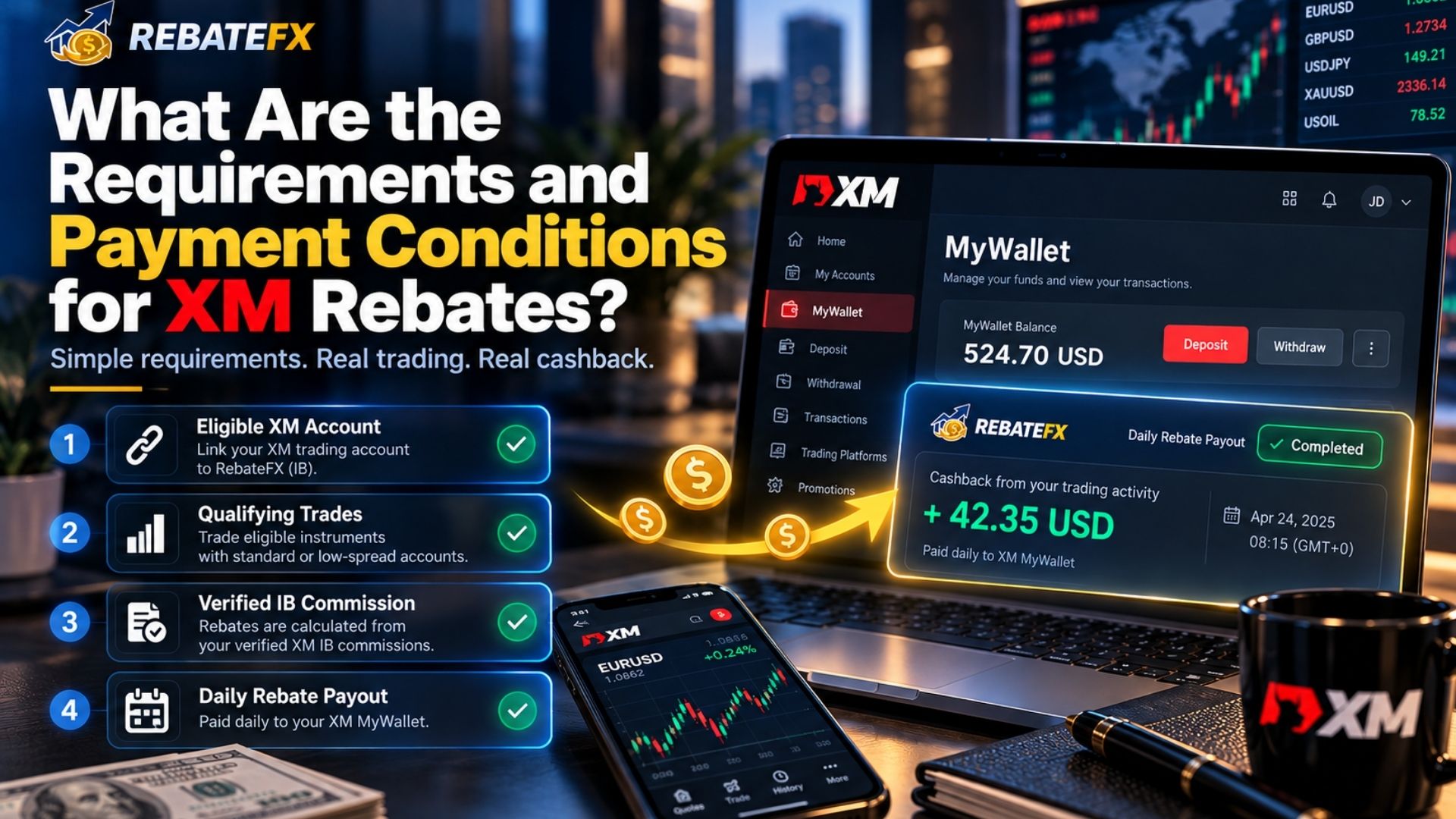
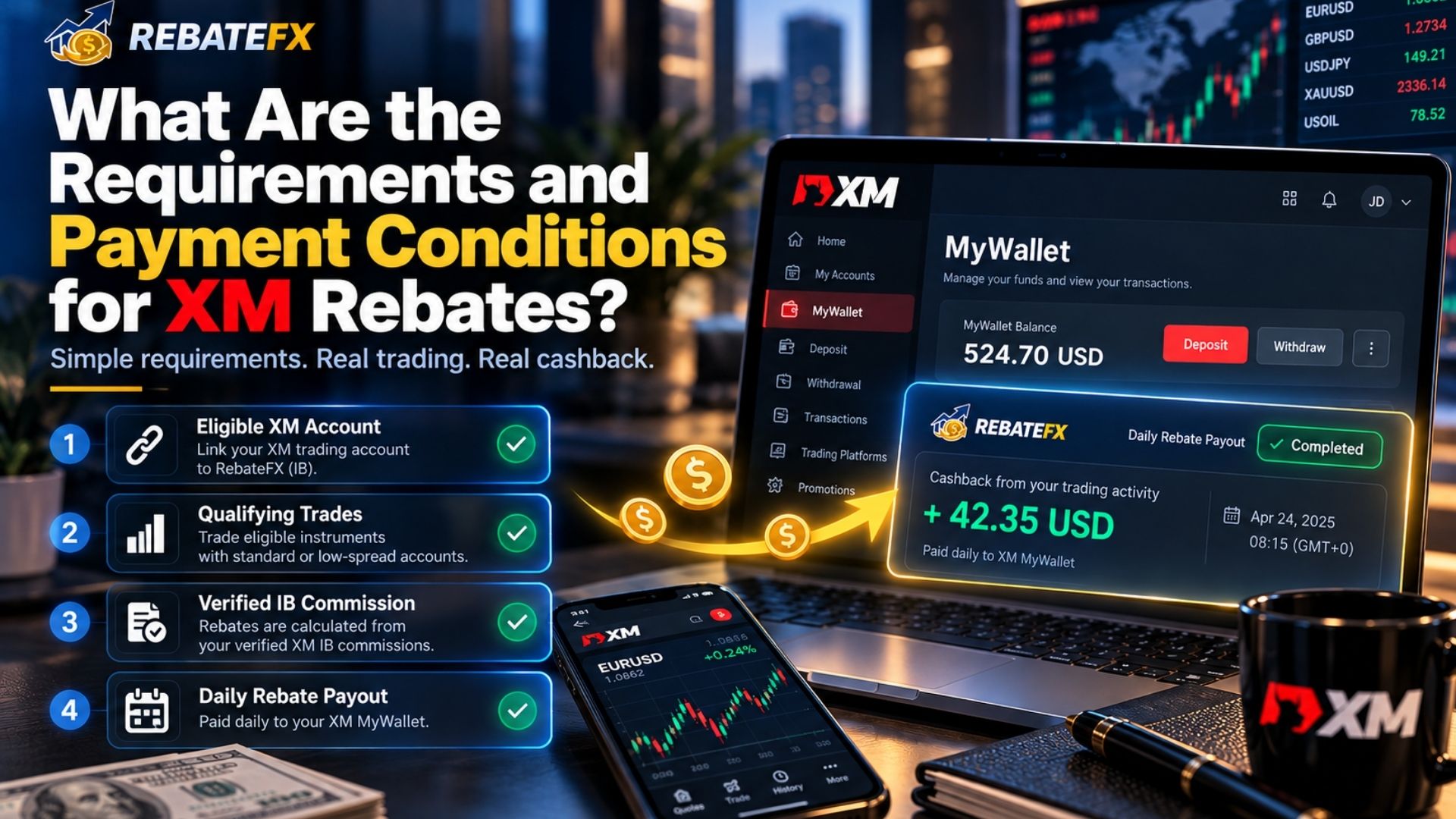
To receive XM rebates through RebateFX, traders must use an eligible XM trading account linked to the correct Introducing Broker (IB).
Cashback is calculated from qualifying trading activity and paid daily, with the approved rebate credited directly to the trader’s MyWallet within XM.
Which XM Accounts and Trades Are Eligible for Cashback?
To qualify for XM cashback, traders should meet the following requirements:
| Requirement | What to Check |
| Correct IB Connection | Your XM trading account is linked to RebateFX. |
| Eligible Account Type | Your account is supported under the XM rebate program. |
| Qualifying Trades | Your transactions meet the applicable IB commission conditions. |
| Trading Volume | Eligible trading volume is recorded for rebate calculation. |
| Regional Eligibility | Your XM entity and country of residence support the arrangement. |
| Verified Commission | XM has confirmed the eligible IB commission. |
Rebates are calculated based on the qualifying IB commission generated by your trades, not directly on the spread or trading commission you pay.
Both profitable and losing trades may qualify for cashback if they meet the program conditions. However, not every account or transaction is automatically eligible.
Eligibility rules also vary across brokers, as explained in the XTB Rebate guide, where partner agreements and regional restrictions can affect cashback availability.
When and How Are XM Rebates Paid?
XM rebates through RebateFX are paid daily when eligible trading activity generates qualifying IB commissions.
Instead of requiring a separate cashback withdrawal request, RebateFX credits the approved rebate directly to your XM MyWallet, the internal wallet associated with your XM account.
The payment process works as follows:
- Complete Eligible Trades: Trade through your XM account linked to RebateFX.
- Rebate Calculation: Qualifying IB commissions are verified and used to calculate your cashback.
- Daily Cashback Payment: RebateFX processes the eligible rebate on a daily basis.
- Receive Cashback in MyWallet: The approved amount is credited directly to your XM MyWallet.
If you have no qualifying trading activity, there may be no new cashback to credit for that day. Processing and posting times may also depend on commission verification.
To check your payment, log in to your XM account and review the available transaction history in MyWallet.
If your expected rebate has not appeared after the applicable processing period, contact RebateFX Support to verify your IB connection, eligible trades, and payment status.
How to Check XM Rebate and Track Your Cashback
To check XM rebate, traders need to review their eligible trading activity and confirm whether the cashback has been credited or paid. The exact method depends on how the rebate program processes payments.
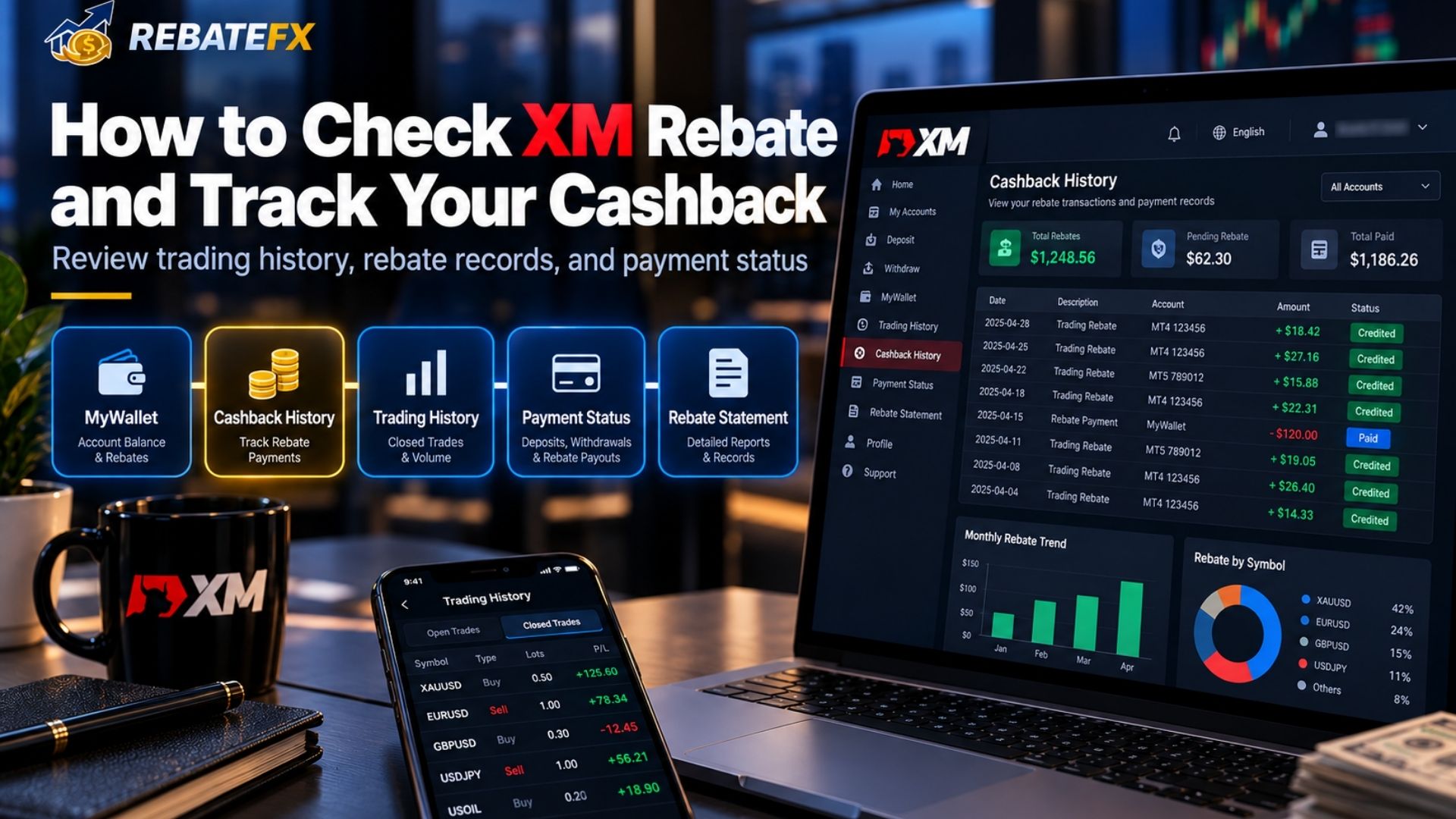
If you receive XM cashback through RebateFX, you should first confirm that your trading account is correctly linked to the program.
Where Can You Check Your XM Rebate?
There are two main ways to check XM cashback, depending on your payment arrangement.
Check Your XM Trading Account
If your rebate program supports direct cashback credits through XM, log in to your XM Members Area or XM App.
- Open your trading account or wallet section.
- Check the transaction history for any cashback or rebate credits.
- Compare the credited amount with your eligible trading activity.
You can also review your closed trades through MT4 or MT5 to check trading volume. However, your trading history may not display cashback paid separately by a rebate provider.
Check Your Cashback Through RebateFX
If RebateFX handles your cashback payments separately, request or review the available rebate statement or payment confirmation.
You should verify:
- Your XM trading account number.
- Eligible trading volume and commission.
- Calculated XM cashback amount.
- Payment date and status.
If you cannot access a rebate report, contact RebateFX to confirm your accumulated cashback and payment history.
How to Verify Your XM Rebate Payment History
Follow these steps to check whether your cashback has been recorded correctly:
- Confirm Your IB Connection: Make sure your XM trading account is associated with the eligible RebateFX partner arrangement.
- Review Your Trading History: Check your closed trades, trading volume, and relevant dates through XM or MT4/MT5.
- Check Your Cashback Records: Compare your eligible trading activity with the rebate statement or confirmed payment record.
- Verify the Payment: Check the payment destination specified for your rebate arrangement to confirm that the cashback has arrived.
Important: The XM Partners Platform is designed for Introducing Brokers to track client activity and commissions. Regular traders do not automatically have access to these partner reports.
Cashback availability, calculation, and payment methods may vary by country, XM entity, and program conditions. If your XM rebate payment history shows missing or incorrect amounts, contact RebateFX Support for assistance.
XM Rebate Not Received: Common Reasons and How to Fix It
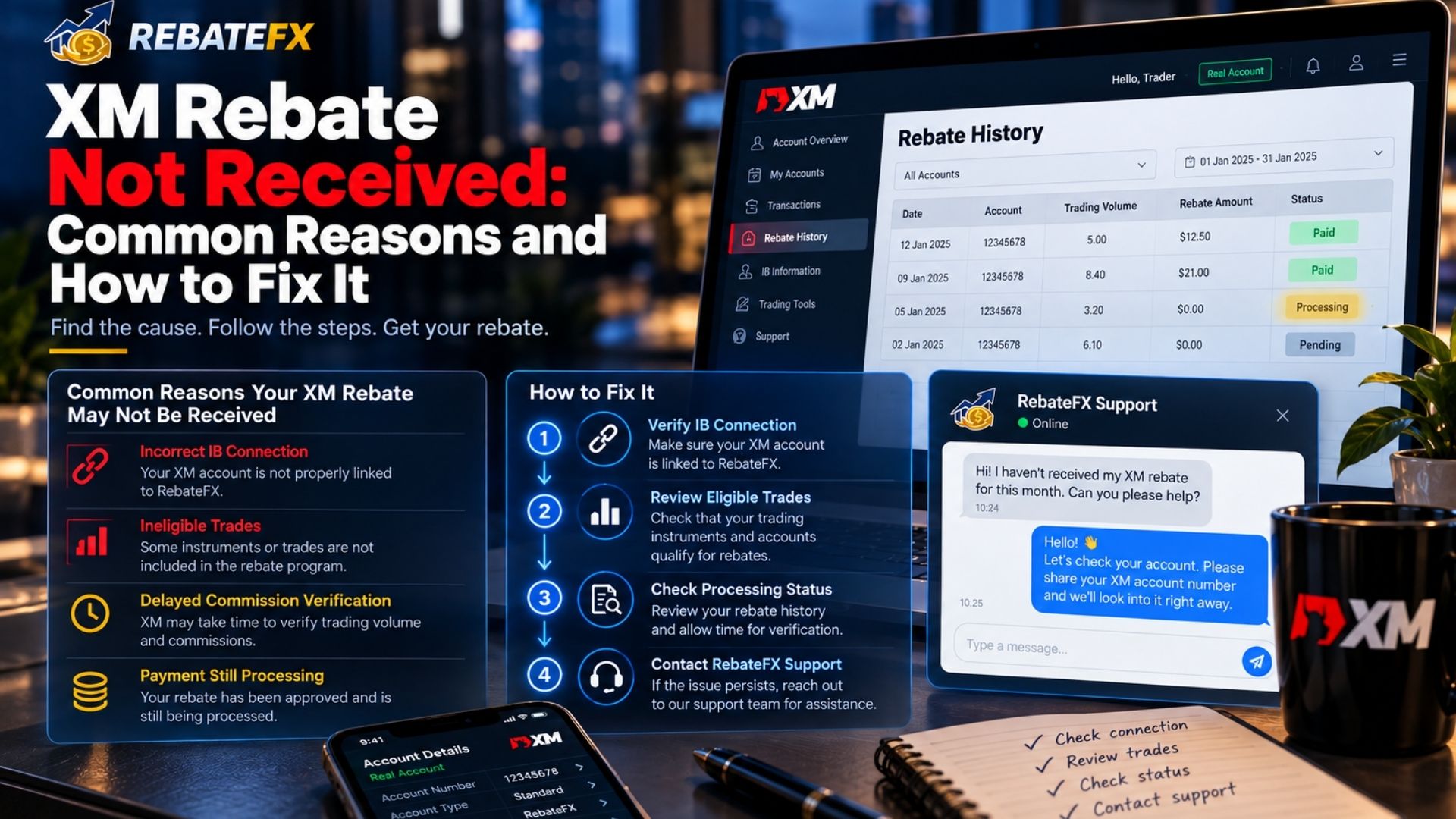
If your XM rebate is not received, the issue may be related to an incorrect IB connection, ineligible trades, delayed commission processing, or pending cashback payments. Before contacting support, check the possible reasons below to understand why your XM cashback is missing or delayed.
Why Is My XM Rebate Missing or Delayed?
Several factors can prevent XM rebates from being recorded or paid correctly.
| Problem | Possible Reason | Recommended Solution |
| No cashback received | Your XM account is not linked to the correct IB | Confirm your IB connection with XM |
| Rebate amount is lower than expected | Different account types or instruments generate different commissions | Review the applicable rebate calculation |
| Some trades generate no rebate | Certain transactions may not meet the program requirements | Check trading eligibility conditions |
| Cashback is still pending | Eligible commissions have not been fully verified | Wait for confirmation or check the processing status |
| Rebate payment is delayed | Payment processing or reconciliation is incomplete | Contact RebateFX for payment verification |
| Trading volume does not match | Incorrect account, trading period, or eligible lot calculation | Compare your closed trades with rebate records |
A missing XM rebate does not necessarily mean the cashback has been lost. In many cases, the issue can be identified by reviewing the account connection, eligible trading activity, and payment status.
How to Resolve XM Rebate Payment Issues
If your XM trading cashback is missing or incorrect, follow these steps:
Step 1: Verify Your XM IB Connection
Make sure the trading account is correctly associated with the RebateFX partner arrangement. If you recently opened an additional XM account, confirm that the new account is eligible for rebates.
Step 2: Review Your Eligible Trades
Check your closed trading history in XM or MT4/MT5. Compare the relevant trading volume, instruments, and dates with the rebate records available to you.
Step 3: Check the Rebate Processing Status
Determine whether your cashback is still being calculated, awaiting commission confirmation, or pending payment. The payment schedule depends on the applicable RebateFX program conditions.
Step 4: Contact RebateFX Support
If the problem remains unresolved, visit the official RebateFX Contact page and request assistance.
You may need to provide:
- XM trading account number.
- Relevant order or ticket numbers.
- Trading dates and eligible lot sizes.
- Details of the missing or incorrect rebate.
- Supporting screenshots, if requested.
RebateFX can assist with checking cashback records and payment reconciliation. However, issues involving account verification, IB assignment, deposits, withdrawals, or trade execution must be handled directly by XM.
Important: Never share your trading password, one-time password (OTP), or security verification codes when requesting rebate support.
Frequently Asked Questions About XM Rebates
1. Is XM Rebate Free to Join?
Joining the XM rebate program through RebateFX generally does not require a separate registration fee. Standard XM trading costs still apply, and cashback depends on the program’s eligibility conditions.
2. Can I Receive XM Rebates on Losing Trades?
Yes, losing trades may still qualify for XM rebates if they meet the program’s commission requirements. Cashback is based on eligible trading activity, not whether a trade makes a profit.
3. Does XM Cashback Change My Spread or Commission?
No, XM cashback does not directly change the spreads or commissions charged by XM. Instead, it returns a portion of eligible IB commission to help reduce effective trading costs.
4. Can I Get XM Rebate on an Existing Account?
You generally cannot change the IB code on an existing XM trading account. However, you may be able to open an additional account under the RebateFX partner code, subject to XM’s rules.
5. How Long Does XM Cashback Take to Arrive?
XM cashback payment times depend on commission verification and RebateFX’s processing schedule. Contact RebateFX to confirm the payment arrangements for your account.
6. Is RebateFX the Official XM Broker?
No, RebateFX is an independent Forex rebate platform and Introducing Broker, not XM’s official website. XM remains responsible for trading accounts, order execution, and client funds.
Conclusion
XM rebates help eligible traders reduce their effective trading costs by receiving cashback on qualifying trades. Through RebateFX, traders can register an XM account, verify their IB connection, and track their rebate payments.
To get started, register through the RebateFX referral link and complete the required steps to qualify for cashback. For further assistance, contact RebateFX support.